Customization of Date Format

The date format is fixed to month/day/year. The app could smart enough to use the date format of the phone.
-
Official comment

@tai @allan - in BNI Connect, and the app, this will be tied to the LANGUAGE setting. Once the translation app is rolled out (it is being tested now) this should automatically affect this change. I will double check on that with the programmers just to be sure!
-

Hi Tai,
Good observation and idea.
The app follows the system date, which is US format, which also follows BNI Connect web version.
+1 from me.
0 -
@Jeremy, just to highlight. The dates in web is showing the correct format. Do let us know when the translation app is done. Cheers!
0 -
@allan - The date in the slips listing is spelled out and we don't expect that to change, it will remain with the month spelled out then the day: https://www.screencast.com/t/F09tIDGhVlR
However in the detail view that should appear correctly for your language: https://www.screencast.com/t/dEmOwk7N
To be sure - which are you referring to?
0 -
@Jeremy, the 2nd part. It's in mm/dd/yy format.
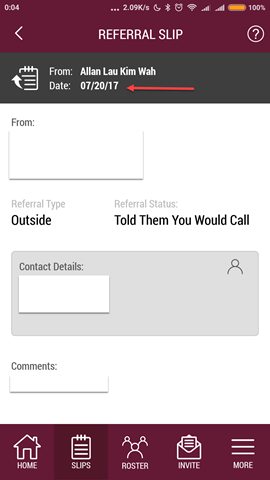 0
0 -
@allan - thanks a bunch, we are looking into it with testing\development. For the record - it is currently working in the current English US and UK languages to recognize the format.
0 -
Glad to help. Will wait your good news.
0 -

To avoid confusion in date format , kindly look at providing it as 20 Jun 2022 instead of mm/dd/yy
0
Please sign in to leave a comment.
Comments
8 comments